Ubuntu: Make ALSA default instead of PulseAudio
PulseAudio has still problems with some applications and it always adds a little latency and that's the reason, why so many people still prefer ALSA. This howto shows you, how to remove PulseAudio, add alsa-mixer applet to the panel and associate hotkeys for volume change.
1. Remove PulseAudio
This will uninstall PulseAudio, delete the configuration files and uninstall it's dependencies; gstreamer-10-pulseaudio, libpulse-browse0, libpeexdsp1, pulseaudio-esound-compat, pulseaudio-module-udev, pulseaudio-module-x11, pulseaudio-utils, rtkit and gnome-desktop (don't worry, it is dummy package):
sudo apt-get purge pulseaudio
2. Install alsa-mixer (volume) applet
PulseAudio removes volume applet, so you need new volume applet. For getting it to work, you need to intall the following packages: python, python-notify, python-gtk2, python-alsaaudio and xfce4-mixer or gnome-alsamixer (i preffer xfce4-mixer).
sudo apt-get install python python-notify python-gtk2 python-alsaaudio python-eggtrayicon xfce4-mixer
Download alsamixer-applet:
wget http://howto.blbosti.com/files/alsa/alsa_mixer_applet_1.1.tar.gz
Extract all files for example into /usr/local/bin direcotry:
sudo tar -C /usr/local/bin/ -xzvf alsa_mixer_applet_1.1.tar.gz
Make all files executable (if they're not):
cd /usr/local/bin sudo chmod +x alsa* sudo chmod +x volbar.py
If you want to use your keyboard's volume hotkeys, you have to set them in System > Preferences > Keyboard Shortcuts. Click Add.
Name: ALSA Volume mute Command: /usr/local/bin/alsa_master_mute
Name: ALSA Volume down Command: /usr/local/bin/alsa_master_down
Name: ALSA Volume up Command: /usr/local/bin/alsa_master_up
Then click on Disabled in the second column and map your hotkeys for these actions.
Finally the programs volbar.py and alsavol.py have to be set to start automatically. This can be set under System > Preferences > Startup Applications. Click Add:
Name: volbar Command: /usr/local/bin/volbar.py Name: alsavol Command: /usr/local/bin/alsavol.py
Note: If you have installed gnome-alsamixer instead of xfce4-mixer, you need to edit volbar.py
sudo gedit /usr/local/bin/volbar.py
Find the line 97 and replace xfce4-mixer to gnome-alsamixer:
subprocess.Popen("gnome-alsamixer")
Now restart your computer and test, if everything is working.
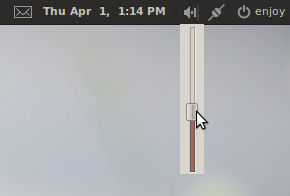
A click on the tray icon opens the slider.
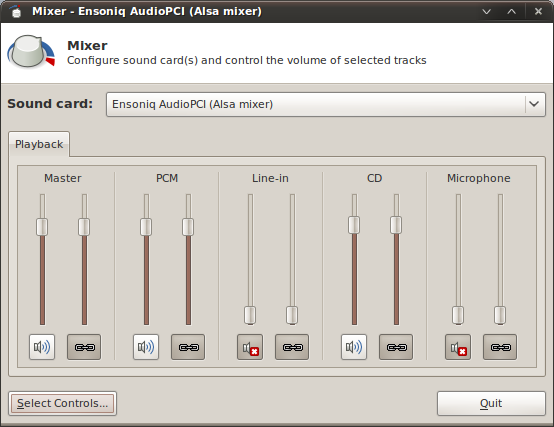
Double-clicking opens the mixer.
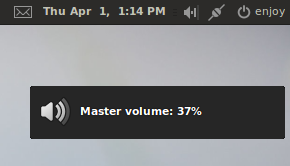
Use hotkeys to change volume – these changes will be shown via libnotify.
Note: Unfortunately, this solution is not perfect, because Totem does not play audio and in Nautilus does not work audio preview on mouse over. If you have any other solution, please, let me know.
UPDATE
ThomasEgi wrote another solution:
Instead of removing pulseaudio you can also stop if from auto-restarting and simply killing it of with an auto-starter each time you login.
echo autospawn = no|tee -a ~/.pulse/client.conf && killall pulseaudio
After that, simply put killall plulseaudio into your autostart. You still need the alsa-mixer stuff and totem/audio-preview are also broken. but it’s quite useful for when you want to temporarily switch to alsa or any other sound system.
Files to download:
Edit: I found another way at webupd8.org.
Related posts:


Cay Horstmann
3 Apr, 2010
Really, noticeable delays with PulseAudio? I haven’t seen that, and I made a lot of screencasts last year, using a mediocre laptop. The PulseAudio control panel has really saved my bacon when I kept switching microphones. I don’t think getting rid of it is the answer. But to each their own–it’s the Linux way :-)
David
3 Apr, 2010
People really need to stop complaining about Pulseaudio. Pulseaudio is not broken. It is way better than anything that Linux has ever had in this area, and it does not create latency, it in fact improves it in a multi-audio environment. If programs don’t work well with Pulseaudio it is because of the extremely broken infrastructure we had before. Plusaudio is a fix for what we used to have. If you want good audio in Linux, you need to support Pulseaudio. I haven’t run in to any programs that don’t support and work great with Pulseaudio for the past year and half, if not longer.
ThomasEgi
3 Apr, 2010
instead of removing pulseaudio you can also stop if from auto-restarting and simply killing it of with an auto-starter each time you login.
echo autospawn = no|tee -a ~/.pulse/client.conf && killall pulseaudio
after that, simply put killall plulseaudio into your autostart.
you still need the alsa-mixer stuff and totem/audio-preview are also broken. but it’s quite useful for when you want to temporarily switch to alsa or any other sound system.
J Story
3 Apr, 2010
Using OSS4 instead of PulseAudio works very well too. Unfortunately, it looks like a lot needs to happen for it to make it into the kernel.
As for PulseAudio, it was clearly brought into distributions long before it was ready. Until it is, there should be a straightforward way of switching the audio system.
johnny
3 Apr, 2010
I recommend using OSSv4 instead of either ALSA or Pulse. That’s what I do and I never have any issues whatsoever with audio anymore, unlike when I used Pulse Pulse which crashed constantly.
enjoy
3 Apr, 2010
I have often met with the question of how to remove pulseaudio and make alsa default. So I wrote this howto.
Bad latency? Try LMMS with PulseAudio (I don’t like this combination).
JP
3 Apr, 2010
Help me understand why I want to remove Pulseaudio? Pulseaudio does not replace ALSA. It removes the additional layer between ALSA, ESD, and the kernel, so why would I replace Pulseaudio with ALSA as it does nothing for me, but add complexity back into the mix.
Why not FIX the problem you are having? (going back to the complex legacy audio is NOT fixing the problem). The easiest way to FIX your issues is to file a bug on it.
95% of the users out there are running Pulseadio since 9.10 with NO problems including ME. It runs great on 10.04 LTS beta 1.
0e8h
3 Apr, 2010
ALSA doesn’t support multi access to sound.
Why should Linux users, especially new ones, be crippled by those who can’t get PulseAudio working.
The problem isn’t PulseAudio, it’s people’s configuration, most likely old modified scripts from various updated OS series, or a not so good sound chip driver that needs more attention.
matt
3 Apr, 2010
Umm ALSA does support multi access to sound, dmix for output and dsnoop for input. It is part of the reason that everyone moved from OSSv2 to ALSA all those years ago.
Bill Hemp
3 Apr, 2010
The real issue is to investigate any potential problems with your sound card so that it works OK with PulseAudio.
Going back to Alsa is silly and does a disservice to open-source software. Make an effort to figure out the source of any audio problem.
andywebsdale
3 Apr, 2010
I’m using Debian Squeeze – I was initially dissatified with PulseAudio. However, a few updates later, it works fine. The only problem I’ve got is quake2(yes I know its ancient)- there’s either no sound or very corrupted sound that sounds like small samples fed through an echo.I suspect this is as much quake2′s fault as PulseAudio’s. If anyone’s got a suggestion that actally works, that’d be great, though I’ll give ThomasEgi’s idea a go,& see if that helps.
eugene
3 Apr, 2010
Yes, I admit, pulse works well for most audio chips. It does not seem to cooperate with mine made by the infamous ATI. Since, ati is known to be hostile to foss, the blame should fall on it. However, i have had no problems with the old pre-pulse alsa-only setup. Now I do. Most reliable applications like mplayer, xmms, amarok crash on a regular basis under pulse. They never did so before.
The issue is not that PulseAudio is bad. It is rather the fact, that NO ALTERNATIVES are offered. You pretty much have to use PA, or you inflict a lot of headache after its removal. I managed to diminish that to almost nothing: the only problem I am having is the capriciousness of ekiga crashing every now and then without pulse (perhaps it wants oss, which i do not have). This is a minor headache compared to that when using Pulse.
Misconfiguration might be the culprit, nevertheless, this is a BUG and I do not want to wait until it gets fixed. My video chip dri related bug hasn’t been fixed for years.
Segedunum
3 Apr, 2010
PulseAudio still has a lot of severe problems with many applications that are likely to be unsolved. The ALSA situation hasn’t been great, but we are where we are and the situation has not improved. If you’ve ever tried to play a game on a Linux distribution that you’ve played over many years (Castle Wolfenstein) the latency is an absolute joke. We’re talking a couple of seconds at times, and it can be random. That is NOT the fault of the application because it was developed for what was available and recommended.
File a bug about this? It’s your distribution. It’s your configuration. You’re using an application that doesn’t interest most people and doesn’t interest the PulseAudio developers. Use pure ALSA? The problems go away. Use OSS with ALSA emulation? The problems go away.
What do you expect to happen? I’m not debugging PulseAudio because it is somehow my fault – apparently.
Sorry, but PulseAudio has set sound back on Linux many, many years. We had just managed to get over the disaster of ALSA. The move should have been minimise or even eliminate the need for userspace sound servers, but we now have something else to go wrong. dmix is an option, it has its own problems but it’s an example of a simple approach that should have been taken to the ‘problem’.
Segedunum
3 Apr, 2010
In addition, you’ve still got many multimedia applications like MythTV actively telling users to turn it off – no questions asked. That tells you it isn’t good enough.
Multimedia sound on a desktop? Maybe we should get to a well thought through solution that works first of all before telling users to just lump it?
Rickster
17 Apr, 2010
One thing is for sure. Linux audio in general, is nothing but a piece of broken-KAKA, it’s full of egocentric dev/programmer fools. why ?, why is this ?
Because unless “they” think if it, or invent it, well it just can’t be any good, right ?!
This is the same mindset that Mr. Linus Gates-Torvalds took over ZFS ! Torvals is just a big-baby.
alsa, pulseaudio, oss, esd, …, grandma’s panties, …
So after PA fails, they should name their next audio fiasco “Pride-Pulse” -as in “PeePee”, “pride before the FALL!”
There is a complicated (but getting blurrier each day) level between “real” professional linux audio enthusiasts, (like the uses of JACKd,…) and the likes of most users.
Basically the average consumer just needs to “click on APP and sound is supposed to be Heard, and properly, ALL THE TIME” -Windows has been doing this flawlessly even BEFORE Linux was born. And Apple, has been doing this even longer.
Linux (mostly the fools I mentioned above) are destroying the “viablity” of Linux to ever become a good alternative Windows-replacement OS.
For krist’s sake ppl. Its “audio” ‘ya know 2020kHz, can we not even get this right in Linux after 18 freekin’ YEARS !
Linux, didn’t seem get it right with esd, alsa,…, and simply adding yet another complication-”bandaid” like pulseaudio isn’t going to fix it all.
ALSA probably came close, but OSS semmed to have the BETTER “universal” quality overall, to me, and I’m talking about average comsumer-level needs and wants.
I have no idea where OSS is going now though. ?
Until Linux dev’s realize that there has to be “STANDARDS” at the interface-level of audio hardware to the firmware/driver/software just in front of it then it’ll never really work for “everything”.
every audio application will “HAVE” to talk a certain amount of agreed-upon language for all to work.
Running different directions at the same time is gonna get the rest of us NOWHERE, as this past “linux audio” has laughingly proved.
Oh ya, and when things get real pushy, lets blame those “windows-only-proprietary” audio chipmakers’ because it all their fault for needing-to-make-a-living.
Naaa, I say this time, Linux has no one to blame but themselves.
“OPEN”-Hardware anyone ?
Happy Now ?!
SunShadow
18 Apr, 2010
Thank you very much for your solution. I’ve have problems with Pulseaudio both in Ubuntu and OpenSuse so far
JanC
28 Apr, 2010
For those who have problems with old games (that use ALSA incorrectly) in combination with PulseAudio: why don’t you just run those games with ‘pasuspender’?
Warren
1 Jun, 2010
Be aware: Purge of pulseaudio CAN TRASH YOUR SYSTEM.
I did a purge on pulseaudio; then I spent the next two days trying to fix my broken system to where I could even log into the gnome desktop environment. Inspection of the apt log revealed that the purge removed 97 core system components, libraries, and applications along with pulseaudio.
This is not a joke. If you want to see the list of what was removed by “sudo apt-get purge pulseaudio” see my post at http://ubuntuforums.org/showthread.php?t=1496120 .
I’m running ubuntu lucid (10.04) on a Dell Inspiron 9100.
enjoy
1 Jun, 2010
This tutorial is for 9.10, but it works also under 10.04.. the command “sudo apt-get purge pulseaudio” removes only gnome-desktop dummy package, not the whole gnome-desktop.
http://howto.blbosti.com/wp-content/uploads/2010/06/purge-pulseaudio2.png
Amy
6 Jun, 2010
PulseAudio still has a lot of severe problems with many applications that are likely to be unsolved. The ALSA situation hasn’t been great, but we are where we are and the situation has not improved. If you’ve ever tried to play a game on a Linux distribution that you’ve played over many years (Castle Wolfenstein) the latency is an absolute joke. We’re talking a couple of seconds at times, and it can be random. That is NOT the fault of the application because it was developed for what was available and recommended.
File a bug about this? It’s your distribution. It’s your configuration. You’re using an application that doesn’t interest most people and doesn’t interest the PulseAudio developers. Use pure ALSA? The problems go away. Use OSS with ALSA emulation? The problems go away.
What do you expect to happen? I’m not debugging PulseAudio because it is somehow my fault – apparently.
Sorry, but PulseAudio has set sound back on Linux many, many years. We had just managed to get over the disaster of ALSA. The move should have been minimise or even eliminate the need for userspace sound servers, but we now have something else to go wrong. dmix is an option, it has its own problems but it’s an example of a simple approach that should have been taken to the ‘problem’.