If you are using Elementary theme you have probably noticed that OpenOffice (LibreOffice) is missing scrollbars. I found an easy solution for this bug, just follow these few steps.
1. Backup your original elementary gtkrc file
sudo cp /usr/share/themes/elementary/gtk-2.0/gtkrc /usr/share/themes/elementary/gtk-2.0/_gtkrc.bak
2. Edit elementary gtkrc file
sudo gedit /usr/share/themes/elementary/gtk-2.0/gtkrc
3. Search and replace (If You're using Elementary 2.1 click here)
Find around ln 57
GtkRange ::slider-width = 8
Replace with
GtkRange ::slider-width = 10
Find around ln 64
GtkScrollbar       ::has-backward-stepper       = 0
GtkScrollbar       ::has-forward-stepper        = 0
Replace with
GtkScrollbar       ::has-backward-stepper       = 1
GtkScrollbar       ::has-forward-stepper        = 1
Find around ln 68
GtkScrolledWindow ::scrollbars-within-bevel = 1
Replace with
GtkScrolledWindow ::scrollbars-within-bevel = 0
4. Save gtkrc.
5. Log out and log back in. Now you can try to open OpenOffice. You should see your scrollbars.
Credit goes here.
UPDATE 17.01.2011
Here is the modifiet gtkrc file. Simply follow these steps:
cd && wget http://howto.blbosti.com/files/elementary-libreoffice/gtkrc.tar.gz
tar xf gtkrc.tar.gz
sudo cp /usr/share/themes/elementary/gtk-2.0/gtkrc /usr/share/themes/elementary/gtk-2.0/gtkrc.bak
sudo cp gtkrc /usr/share/themes/elementary/gtk-2.0/gtkrc
Then log out and log in and voila…
UPDATE 14.03.2011 – Elementary 2.1
There were changes in Elementary 2.1 gtkrc, so the scrollbar disappears after an update. You need to edit the gtkrc file again.
Search and replace:
Find around line 67
GtkScrollbar        ::has-backward-stepper              = 0
GtkScrollbar        ::has-forward-stepper               = 0
Replace with
GtkScrollbar        ::has-backward-stepper              = 1
GtkScrollbar        ::has-forward-stepper               = 1
Find around line 74
GtkScrolledWindow ::scrollbars-within-bevel = 1
Replace with
GtkScrolledWindow ::scrollbars-within-bevel = 0
OPTIONAL STEP
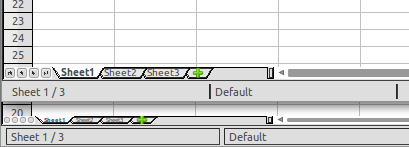
It is good to change scrollbar width, because of horizontal scrollbar in In Calc / Spreadsheet
Bottom – original scrollbar width (6), and deformed icons and sheet tabs.
Top – changed scrollbar width to 10 and sheets are now readable and icons visible. You can change the icon width.. find your optional width.
To change the scrollbar width find around line 70
GtkScrollbar ::slider-width = 6
Replace with
GtkScrollbar ::slider-width = 10
If You don't want to edit your file, paste these lines into terminal window.
cd && wget http://howto.blbosti.com/files/elementary-libreoffice/gtkrc-elementary2.1.tar.gz
tar xf gtkrc-elementary2.1.tar.gz
sudo cp /usr/share/themes/elementary/gtk-2.0/gtkrc /usr/share/themes/elementary/gtk-2.0/gtkrc.bak
sudo cp gtkrc /usr/share/themes/elementary/gtk-2.0/gtkrc
gtkrc file to download